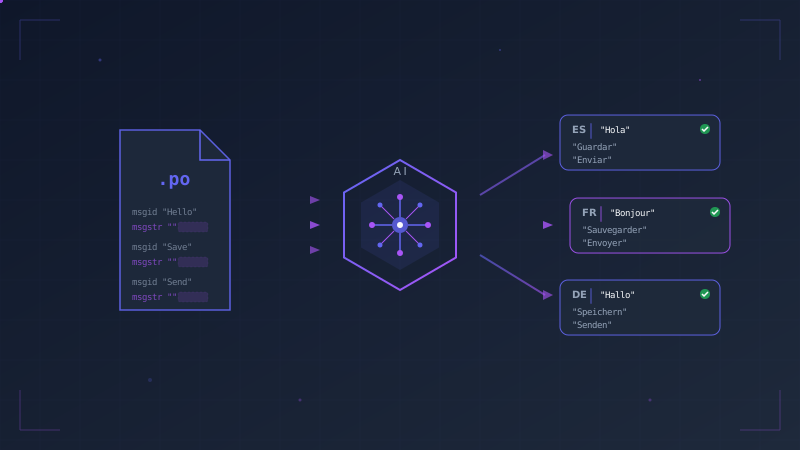
If you've ever shipped a Django app in more than one language, you know the drill. You wrap your strings in gettext(), run makemessages, open a .po file with hundreds of entries, and start translating line by line. For two languages and fifty strings, that's tolerable. For six languages and five hundred strings, it's a full workday you'll never get back.
This guide covers Django's internationalization (i18n) pipeline from start to finish, explains where it breaks down, and shows how to automate the painful part with AI-powered translation.
The Standard Django i18n Workflow
Django's built-in i18n system is well-designed. The core loop looks like this:
Step 1: Mark strings for translation in your Python code and templates:
from django.utils.translation import gettext as _

def dashboard(request):
    welcome = _("Welcome back, %(name)s!") % {"name": request.user.first_name}
    return render(request, "dashboard.html", {"welcome": welcome})
{% load i18n %}
<h1>{% trans "Account Settings" %}</h1>
<p>{% blocktrans %}You have {{ count }} unread messages.{% endblocktrans %}</p>
Step 2: Extract strings into .po files:
python manage.py makemessages -l de -l fr -l nl
This scans your entire codebase and generates one .po file per language, containing every translatable string:
#: myapp/views.py:4
msgid "Welcome back, %(name)s!"
msgstr ""

#: templates/dashboard.html:2
msgid "Account Settings"
msgstr ""
Step 3: Translate every empty msgstr by hand.
Step 4: Compile the finished .po files into binary .mo files:
python manage.py compilemessages
Steps 1, 2, and 4 are quick. Step 3 is where the process falls apart.
Why Manual Translation Does Not Scale
A typical Django application has somewhere between 200 and 2,000 translatable strings. Multiply that by the number of target languages, and you're looking at a serious time commitment.
This isn't a theoretical complaint. In a well-known Django Forum thread, a developer reported spending 8+ hours per .po file doing manual translations. A Django core contributor described spending over 10 hours to incorporate community-submitted translations into a single release, mostly on review, formatting corrections, and fixing broken placeholders.
The problems compound over time:
- Placeholders break. Copy a string like
Welcome, %(name)s!into Google Translate, and you'll often get backWillkommen, %(Name)s!orBienvenue, %(nom)s!. That subtle corruption causes runtime crashes. - Consistency drifts. Without a glossary, "dashboard" gets translated as "Instrumententafel" in one file and "Dashboard" in another. Three months later, nobody remembers which was intentional.
- Sprints add strings. Every feature branch adds new translatable strings. Even if you paid for a full translation pass last quarter, you now have 40 untranslated entries scattered across your
.pofiles. - AI assistants help once. You can paste a
.pofile into ChatGPT or Claude and get decent results. But next sprint, when 15 new strings appear, you're prompting from scratch, re-translating the whole file, and hoping it stays consistent with what was already there.
The root cause is that translation is treated as a one-time event instead of an incremental, repeatable process.
Automating Translation with AI
The idea is straightforward: instead of a human opening each .po file and filling in msgstr values, a tool reads the file, sends untranslated strings to an AI model or translation API, writes the results back, and preserves everything else (comments, file structure, placeholders, plural forms).
TranslateBot Django is an open-source package that does exactly this. It plugs into Django's management command system, so it fits into the workflow you already have.
Step-by-Step Setup
1. Install the Package
pip install translatebot-django
Or, if you use uv (recommended):
uv add --dev translatebot-django
Installing as a dev dependency is intentional. You only need TranslateBot when generating translations, not at runtime in production.
2. Add to INSTALLED_APPS
# settings.py
INSTALLED_APPS = [
    # ...
    "translatebot_django",
]
3. Configure Your AI Provider
# settings.py
import os

TRANSLATEBOT_API_KEY = os.getenv("OPENAI_API_KEY")
TRANSLATEBOT_MODEL = "gpt-4o-mini"
TranslateBot uses LiteLLM under the hood, which means you can swap in any of 100+ models by changing a single string:
| Provider | TRANSLATEBOT_MODEL value |
|---|---|
| OpenAI | gpt-4o-mini, gpt-4o |
| Anthropic | claude-sonnet-4-5-20250929 |
gemini/gemini-2.5-flash |
|
| Azure OpenAI | azure/gpt-4o-mini |
| DeepL | Use TRANSLATEBOT_PROVIDER = "deepl" instead |
For DeepL, install the extra: pip install translatebot-django[deepl]. DeepL's free tier gives you 500,000 characters per month at no cost, which is enough for most small-to-medium projects.
4. Define Your Languages
# settings.py
LANGUAGES = [
    ("en", "English"),
    ("de", "German"),
    ("fr", "French"),
    ("nl", "Dutch"),
    ("ja", "Japanese"),
]
5. Run the Translation
python manage.py translate
That's it. TranslateBot scans your project for .po files, identifies untranslated entries, sends them to the configured AI model in optimized batches, and writes the results back. Existing translations are left untouched.
To translate a single language:
python manage.py translate --target-lang nl
The output looks like this:
Translating to Dutch (nl)...
Found 42 strings to translate
Translating batch 1/2...
Translating batch 2/2...
Successfully translated 42 strings
6. Compile as Usual
python manage.py compilemessages
Your full workflow is now:
python manage.py makemessages -l de -l fr -l nl -l ja
python manage.py translate
python manage.py compilemessages
Three commands. Every language. Every sprint.
Incremental by Design
The single most important feature for a repeatable workflow is incremental translation. TranslateBot only translates entries where msgstr is empty. If you have 500 strings and 15 are new this sprint, only those 15 get sent to the API.
This matters for practical reasons:
- Cost. You pay only for new strings, not the entire file.
- Speed. Translating 15 strings takes seconds, not minutes.
- Stability. Translations you've already reviewed and approved are never overwritten (unless you explicitly pass
--overwrite).
Placeholder Safety
Django uses several placeholder formats: %(name)s, %s, %d, {0}, {name}, and inline HTML tags like <strong> or <a href="...">. If any of these get mangled in translation, you get runtime errors or broken markup.
TranslateBot instructs the AI model to preserve all placeholder formats and validates the output. A string like:
Welcome to %(site_name)s! You have <strong>%(count)d</strong> new messages.
Translates to Dutch as:
Welkom bij %(site_name)s! Je hebt <strong>%(count)d</strong> nieuwe berichten.
Every placeholder survives intact.
Controlling Quality with TRANSLATING.md
AI models translate better when they understand context. TranslateBot looks for a TRANSLATING.md file in your project root and includes its contents in every translation request.
# Translation Context

## About This Project
A B2B project management tool for construction companies.

## Terminology
- "project" means a construction project, not a software project
- "plan" means a building plan/blueprint, not a subscription plan
- Keep "Gantt chart" as-is in all languages

## Tone
- German: use formal "Sie" form (business context)
- French: use formal "vous" form
- Dutch: use informal "je" form

## Do Not Translate
- Brand name: "BuildFlow"
- Feature names: "SmartSchedule", "CostTracker"
This file is version-controlled alongside your code, so your entire team shares the same translation context. You can also place per-app TRANSLATING.md files for apps with specialized terminology. A medical records module and a billing module can each have their own glossary.
Preview Before Committing
The --dry-run flag shows exactly what would be translated without making any API calls or modifying files:
python manage.py translate --target-lang fr --dry-run
Found 15 untranslated entries
Dry run mode: skipping LLM translation

Would translate 'Welcome to our site'
Would translate 'Hello, %(name)s!'
...

Dry run complete: 15 entries would be translated
This is useful before a large translation run or when onboarding a new team member who wants to understand what the command does before committing to API costs.
CI/CD Integration
Translations going stale is inevitable without enforcement. TranslateBot includes a check_translations management command designed for CI pipelines:
# .github/workflows/ci.yml
jobs:
  translations:
    runs-on: ubuntu-latest
    steps:
      - uses: actions/checkout@v4
      - uses: astral-sh/setup-uv@v4
        with:
          enable-cache: true
      - run: uv python install
      - run: uv sync --frozen
      - name: Install gettext
        run: sudo apt-get update && sudo apt-get install -y --no-install-recommends gettext
      - name: Check translations
        run: uv run python manage.py check_translations --makemessages
The --makemessages flag runs makemessages -a --no-obsolete first, ensuring that .po files reflect the current source code before checking. If any entries are untranslated or fuzzy, the command exits with code 1 and fails the build:
locale/de/LC_MESSAGES/django.po: 2 untranslated, 0 fuzzy
locale/nl/LC_MESSAGES/django.po: 0 untranslated, 1 fuzzy
CommandError: Translation check failed
The typical developer workflow becomes:
- Add new translatable strings in a feature branch.
- CI fails because those strings are untranslated.
- Run
python manage.py translatelocally. - Commit the updated
.pofiles. - CI passes.
Translations never silently fall out of sync.
Translating Database Content
If your application stores translatable content in the database (product names, blog post titles, category labels), TranslateBot also integrates with django-modeltranslation:
pip install translatebot-django[modeltranslation]
# Translate all registered model fields
python manage.py translate --target-lang de --models

# Translate specific models only
python manage.py translate --target-lang de --models Product Category
The same incremental logic applies: only fields where the target language value is empty get translated.
Cost Comparison
One of the most common questions is whether AI translation is cost-effective compared to alternatives. Here's a rough comparison for a project with 500 translatable strings across 5 languages:
| Approach | Estimated Cost | Time Investment |
|---|---|---|
| Manual (developer time) | $0 out-of-pocket, 20-40+ hours | Very high |
| Professional translation service | $500-2,000+ | Low (but slow turnaround) |
| SaaS localization platform | $50-200/month | Medium |
| TranslateBot + GPT-4o-mini | ~$0.05 (one-time) | Minutes |
| TranslateBot + DeepL Free | $0 (up to 500k chars/month) | Minutes |
| TranslateBot + Claude/GPT-4o | ~$0.30 (one-time) | Minutes |
The numbers shift depending on string count and target languages, but the order-of-magnitude difference is consistent. For ongoing maintenance (translating the 20-50 new strings added each sprint), the AI cost is essentially zero.
Best Practices
Start with --dry-run. Before your first real translation run, preview what will happen. This builds confidence and catches configuration issues early.
Commit .po files before translating. If something goes wrong, git checkout gets you back to a clean state instantly.
Write a TRANSLATING.md from day one. Even a brief file with your project description and a few terminology rules measurably improves translation quality.
Add check_translations to CI. This single step prevents the most common i18n failure mode: strings that were marked for translation but never actually translated.
Use gpt-4o-mini or DeepL for cost efficiency. Save premium models like GPT-4o or Claude for projects where precision matters, like marketing copy, legal text, or domain-specific terminology.
Review critical strings. AI translations are good enough for most UI text, but have a native speaker review anything legally binding, safety-critical, or customer-facing in a high-stakes context.
From Hours to Seconds
Django's i18n framework is excellent at extracting and compiling translations. The gap has always been the translation step itself, the tedious, error-prone work of filling in hundreds of msgstr values across multiple languages.
TranslateBot closes that gap. Install it, point it at an AI provider, and run one command. New strings get translated. Existing strings stay untouched. Placeholders stay intact. CI catches anything that slips through.
Your .po files stop being a chore and start being just another part of the build.
pip install translatebot-django
Get started at translatebot.dev.