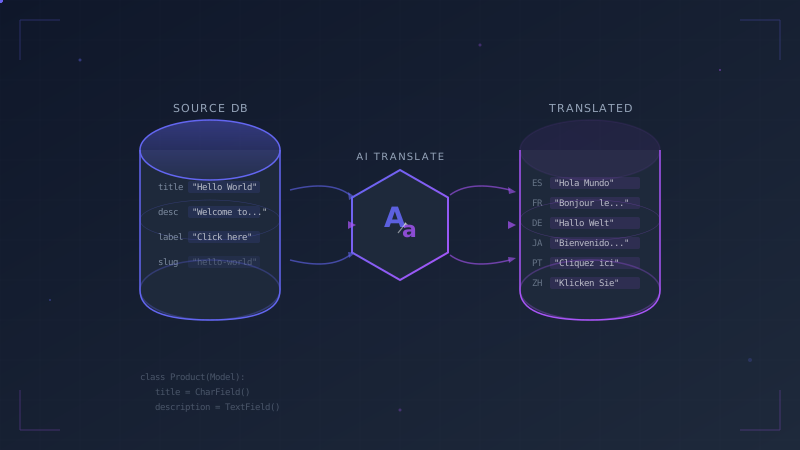
If you've worked with Django's built-in internationalization (i18n) framework, you know it handles static strings well. Wrapping text in gettext() or using the {% trans %} template tag extracts strings into .po files, which translators fill in. The system is battle-tested and works great for code and templates.
But what about the content stored in your database?
Product names, article titles, category descriptions, FAQ answers, user-generated content. None of this lives in your source code. Django's makemessages command will never find it, and .po files can't help you here. If your application serves dynamic content to users in multiple languages, you need a different strategy.
Here's how to do it: use django-modeltranslation to add translatable fields to your models, then automate the translation with AI using TranslateBot.
Django Database Translation Packages
Several third-party packages solve the database translation problem, each with a different architecture.
django-modeltranslation
Adds language-specific columns directly to your existing tables. A title field becomes title_en, title_de, title_fr, and so on. Queries stay fast because everything is in the same table. The admin interface shows all languages side by side.
- Pros: No JOINs, fast queries, transparent access via field descriptors, mature ecosystem
- Cons: Schema changes for each new language, wider tables
django-parler
Creates a separate translation table for each model. The original table stays clean, and translations are stored in a related table joined via foreign key.
- Pros: Clean schema, easy to add languages without migrations
- Cons: Requires JOINs for translated content, slightly more complex query patterns
django-translations
Uses a single translations table with a generic foreign key pointing back to any model. All translations for all models go into one table.
- Pros: Minimal schema changes, works with any model
- Cons: Generic foreign key queries can be slow, less transparent API
Manual JSON Field
You can store translations in a JSONField:
class Product(models.Model):
    name_translations = models.JSONField(default=dict)
    # {"en": "Running Shoes", "de": "Laufschuhe", "fr": "Chaussures de course"}
- Pros: No extra dependencies, flexible
- Cons: No ORM integration, no admin support, manual everything
Which One Should You Use?
For most projects, django-modeltranslation is the best choice. It's the most mature package, has the best Django admin integration, and keeps all data in the same table for fast queries. The tradeoff (wider tables and a migration per new language) is manageable for the vast majority of applications. The rest of this guide uses django-modeltranslation.
Setting Up django-modeltranslation Step by Step
Step 1: Install the Package
TranslateBot bundles django-modeltranslation as an optional dependency. Install both at once:
pip install translatebot-django[modeltranslation]
Or if you use uv:
uv add --dev translatebot-django[modeltranslation]
Step 2: Configure Django Settings
Two things matter in settings.py: the app order and the language list.
# settings.py

INSTALLED_APPS = [
    'modeltranslation',          # Must be BEFORE django.contrib.admin
    'django.contrib.admin',
    'django.contrib.auth',
    'django.contrib.contenttypes',
    'django.contrib.sessions',
    'django.contrib.messages',
    'django.contrib.staticfiles',
    # Your apps
    'shop',
    'translatebot_django',
]

LANGUAGE_CODE = 'en'

LANGUAGES = [
    ('en', 'English'),
    ('de', 'German'),
    ('fr', 'French'),
    ('nl', 'Dutch'),
]
The modeltranslation app must come before django.contrib.admin so it can patch the admin classes to show translation fields.
Step 3: Register Models for Translation
Create a translation.py file in each app that has translatable models. For an e-commerce shop app:
# shop/translation.py

from modeltranslation.translator import register, TranslationOptions
from .models import Product, Category


@register(Product)
class ProductTranslationOptions(TranslationOptions):
    fields = ('name', 'description', 'short_description')


@register(Category)
class CategoryTranslationOptions(TranslationOptions):
    fields = ('name', 'description')
Only include fields that contain human-readable text. Don't register fields like slug, price, or sku.
Step 4: Create and Run Migrations
python manage.py makemigrations
python manage.py migrate
After this, your shop_product table has new columns:
| Column | Type |
|---|---|
name |
varchar(200) |
name_en |
varchar(200) |
name_de |
varchar(200) |
name_fr |
varchar(200) |
name_nl |
varchar(200) |
description |
text |
description_en |
text |
description_de |
text |
description_fr |
text |
description_nl |
text |
short_description |
text |
short_description_en |
text |
short_description_de |
text |
short_description_fr |
text |
short_description_nl |
text |
Every language you defined in LANGUAGES gets its own column for each registered field.
The Problem: Empty Translation Fields
You now have the schema in place, but every _de, _fr, and _nl column is empty. If you have 500 products with 3 translatable fields and 3 target languages, that's 4,500 empty fields waiting to be filled.
Manually translating that content isn't realistic. Even with a professional translation service, you'd need to export the data, send it out, wait for delivery, and import the results back. For a small team or solo developer, this usually means the feature never ships.
This is where TranslateBot comes in.
Automating Translations with TranslateBot
TranslateBot's translate management command can populate all those empty fields using AI. Configure your API key first:
# settings.py

TRANSLATEBOT_API_KEY = os.getenv("OPENAI_API_KEY")
TRANSLATEBOT_MODEL = "gpt-4o-mini"  # Fast and cost-effective
Then translate all registered models to a target language:
python manage.py translate --target-lang de --models
That single command finds every model registered with django-modeltranslation, identifies fields that are empty for the target language, and fills them with AI-generated translations.
Translate Specific Models
If you only want to translate products and not categories:
python manage.py translate --target-lang de --models Product
Or multiple specific models:
python manage.py translate --target-lang de --models Product Category
Preview with Dry Run
Always preview before writing to the database:
python manage.py translate --target-lang de --models --dry-run
This shows you exactly what will be translated without modifying any records.
Re-translate Existing Content
By default, TranslateBot skips fields that already have a translation. To overwrite existing translations (for example, after improving your AI model or adding context):
python manage.py translate --target-lang de --models --overwrite
Translate All Languages at Once
If you omit --target-lang and have LANGUAGES defined in your settings, TranslateBot translates to all configured languages:
python manage.py translate --models
How the Translation Pipeline Works
Here's what happens when you run the translate command.
-
Discovery. TranslateBot queries django-modeltranslation's registry to find all registered models and their translatable fields.
-
Source detection. For each record, it reads the source content. It checks the base field first (e.g.,
name), then falls back to the first populated language-specific field (e.g.,name_en). Records with no source content are skipped. -
Batching. Records are grouped into batches and sent to the AI provider. This keeps API calls efficient and avoids hitting rate limits.
-
Translation. Each batch is translated using the configured AI model. You can use any LLM provider supported by LiteLLM (OpenAI, Anthropic, Google, Azure, and many others) or DeepL.
-
Atomic writes. All database updates for a translation run are wrapped in a single transaction. If anything goes wrong, like an API error or a database constraint violation, no partial data is saved. All or nothing.
Complete Workflow Example
Here's a full example from model definition to translated content, using an e-commerce Product model.
Define the Model
# shop/models.py

from django.db import models


class Product(models.Model):
    name = models.CharField(max_length=200)
    description = models.TextField()
    short_description = models.CharField(max_length=500, blank=True)
    price = models.DecimalField(max_digits=10, decimal_places=2)
    sku = models.CharField(max_length=50, unique=True)
    created_at = models.DateTimeField(auto_now_add=True)

    def __str__(self):
        return self.name
Register for Translation
# shop/translation.py

from modeltranslation.translator import register, TranslationOptions
from .models import Product


@register(Product)
class ProductTranslationOptions(TranslationOptions):
    fields = ('name', 'description', 'short_description')
Run Migrations
python manage.py makemigrations shop
python manage.py migrate
Add Translation Context (Optional)
Create a TRANSLATING.md file in your project root to give the AI context about your product domain:
# Translation Context

## About This Project
E-commerce store for outdoor sports equipment.

## Terminology
- "trail runners" refers to trail running shoes, not people
- Keep brand names (Nike, Salomon, Arc'teryx) untranslated
- "Gore-Tex" is a brand name, do not translate

## Tone
- Use informal "du" form in German
- Product descriptions should sound enthusiastic but not exaggerated
Translate
# Preview first
python manage.py translate --target-lang de --models Product --dry-run

# Apply translations
python manage.py translate --target-lang de --models Product
Output:
Translating Product model fields to German (de)...
Found 142 products with untranslated fields
Translating batch 1/15...
Translating batch 2/15...
...
Translating batch 15/15...
Successfully translated 142 products
Verify in the Admin
Open the Django admin and go to any product. You'll see the translation fields populated:
- Name [de]: Ultraleichte Trail-Laufschuhe
- Description [de]: Diese leichten Trail-Laufschuhe bieten hervorragenden Grip...
- Short description [de]: Leicht, schnell und griffig auf jedem Untergrund.
Repeat for each target language:
python manage.py translate --target-lang fr --models Product
python manage.py translate --target-lang nl --models Product
Or translate all languages at once:
python manage.py translate --models Product
Best Practices
Back up your database before running bulk translations on production. TranslateBot uses atomic transactions, so a failed run won't leave partial data. But having a backup gives you a way to revert if the translation quality isn't what you expected.
# PostgreSQL example
pg_dump mydb > backup_before_translation.sql
Use dry run first. Always run with --dry-run before applying translations to a new model or language. Review the output to make sure source content is detected correctly and translations look reasonable.
Translate one model at a time for large databases. This makes it easier to review results and re-run specific models if needed.
python manage.py translate --target-lang de --models Product
python manage.py translate --target-lang de --models Category
python manage.py translate --target-lang de --models Article
Add translation context. A TRANSLATING.md file with domain-specific terminology and tone guidelines significantly improves translation quality. This is especially important for specialized fields like medicine, law, or technical products.
Keep your source language populated. TranslateBot reads from the base field or the source language field. Make sure your data entry workflow always populates the source language. Empty source fields mean empty translations.
Combine with PO file translation for full coverage. Translate both your code strings and database content:
# Static strings in code and templates
python manage.py makemessages -l de -l fr -l nl
python manage.py translate
python manage.py compilemessages

# Dynamic content in the database
python manage.py translate --models
This way every string your users see, whether it comes from a template or the database, is translated.
Next Steps
- Read the full command reference for all available options
- Set up CI integration to check for missing translations automatically
- Explore supported AI models to find the best balance of quality and cost for your project